How To Get out of MyLife Directory Site
 MyLife compiles personal data from several Internet sites with a stated mission of “helping people find and connect with others by managing the information they choose to share with the world.” The founder’s stated goal is to “create and protect a public image that helps Americans get ahead and enrich their lives.” I have a personal issue with the ethics of gathering information and then charging to remove it and taking it a step further, charging to remove this information from other sites. While I take issue with the harm MyLife (inadvertently) causes some people, I thank them for their willingness and cooperation when it comes to removing information from their site upon request.
When I first wrote this tutorial, you needed to search for your public Mylife profile by going to the MyLife website first. That no longer works because a search on the site leads you to setting up an account in order to hide your own information or to remove your information from other sites. You do not need to pay MyLife to have your information removed and you do not need to take this step!
My removal strategy for MyLife is ridiculously simple, but often takes tenacity and repeated attempts. Here goes:
- Locate your MyLife profile by entering your name into Google in this format including the quotes before and afterwards. “Your First and Last name MyLife” and pressing enter.
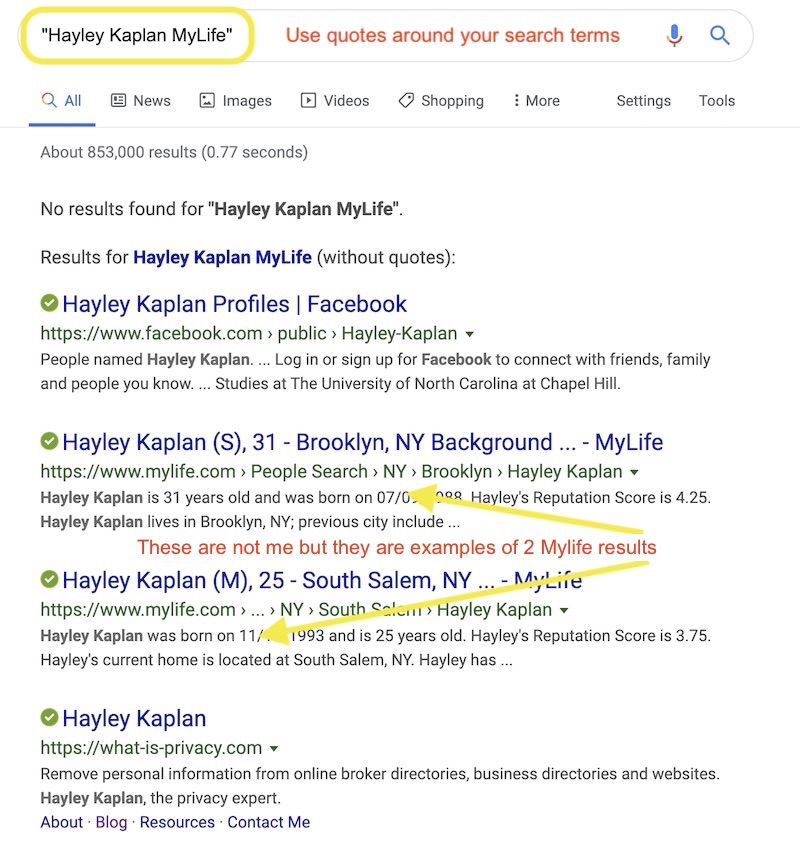
- Once you locate the result that appears to be you, click on it to bring up the related public profile.
- Move your curser to the URL bar, and copy the address of your public profile.
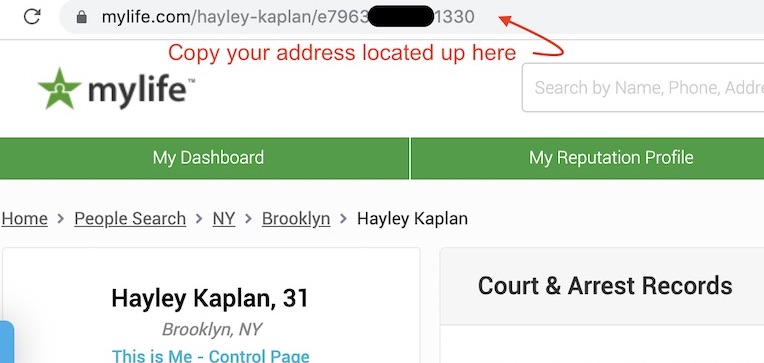
Locate the URL in the address bar
- Open up an email to MyLife by clicking, contact MyLife via email and request that they remove your public profile from their site. Be sure to paste the URL (web address) from Step 3. Keep your email brief and simple. (SAMPLE WORDING: Please remove my information from MyLife. The link to my public profile is https://www.mylife.com/Your First Name-Your Last Name/Your profile number that begins with the letter “e”. Thank you. Your first name and your last name.)
- You will receive a generic email from MyLife to acknowledge receipt of your removal request.
- In a matter of hours or days after you receive the first email from MyLife you will receive a version of the email below telling you that you have been removed from the site. But that doesn’t mean it’s been removed. Keep going to step 7.
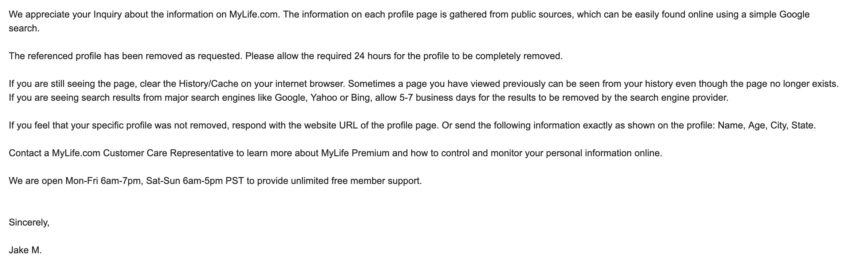
- Once you get confirmation of your removal, you must go back to Step 1 to see if you were removed completely or not.
- If you get a result like the one below when you enter your name, you are done! Congratulations. (If you have a common name, you may see other people listed with the same name, but you will recognize yourself if you remain.)

Sign of a successfully removed profile!
- Alternatively, if you find your information remains on the site, go back to Step 1 and repeat until you have success.
- If you get a result like the one below when you enter your name, you are done! Congratulations. (If you have a common name, you may see other people listed with the same name, but you will recognize yourself if you remain.)
Since complete and prompt removal from MyLife is inconsistent, you may need to reach out to them multiple times. You can follow up by contacting them via 2 separate email addresses: Support or Privacy or you can phone them and ask for assistance at (888) 704-1900 Mon-Fri: 6am – 7pm PST and Sat-Sun: 6am – 5pm. Be optimistic that you will succeed promptly. But if not, multiple attempts and persistence will ultimately result in success! The key is follow up.
IMPORTANT NOTES:
- Some people have multiple profiles on the site. Repeat the directions for each profile however, you can list multiple profile URLS in a single email to MyLife.
- You may get an email with a refusal to remove you because the information is gathered from public sources. If this is the case, go back to step 1 because sometimes MyLife removes your profile in spite of telling you no. If they refuse to remove you and you are still on the site, ignore that letter and start over by going back to the start of the tutorial and sending a fresh removal request to MyLife. Chances are that the next person who receives your email will remove your profile. If not, repeat again, and again until you have success.
- You do not need to take control of your public profile or to edit it, in fact, I recommend against doing that. Simply ask to be removed.
Please let me and other readers know if you run into any issues when you email for assistance (by leaving a comment on this article) and also please share your experience if you become a satisfied paid member of MyLife. That information will be useful for other readers and interesting for me. To be clear, I’ll repeat what I said in the introduction: I have a personal issue with the ethics of gathering information and then charging to remove it and taking it a step further, charging to remove this information from other sites.
Along those lines, if you consider the use of any paid information removal service (including mine), “Buyer Beware!” Make sure you understand exactly what you are getting for your money, what is and what is not covered by the service and how long it will take for meaningful results. Successful and complete removal takes time, regardless of how much you pay for it.
In the meantime, here’s a list to my free opt out tutorials for those of you willing to do your own removals and most importantly, the required follow up! I offer a paid removal service from more than 100 different sites (this number constantly increases) and I add to my tutorials when time allows. You can subscribe to be notified of new articles/tutorials or you can look at all articles anytime.
Until next time,… Stay Cyber Safe!
Note: This article was revised on May 30th, 2019
Note: This article was updated again on October 16, 2019 due to changes on the MyLife site.